

Editor拡張で横着のススメ -Prefabの複数置換編- 紹介
はじめに
この記事は、Unity Advent Calendar 2020、21日目の記事です
Unity - Qiita Advent Calendar 2020 - QiitaCalendar page for Qiita Advent Calendar 2020 regarding Unity.qiita.com
今回の記事は、紹介です。解説は別途。
Prefabを一括で置き換えたいんじゃい!!
こんなことを考えたことはありませんか?
- すでに設置したPrefabを置き換えたい
- ステージ作ったけど、いくつか障害物にしたい
などなど、色んなシーンで使えそうなEditor拡張を書いてみました。
前提
他にもやりたいことがたくさんある場合、こちらのAssetがめちゃくちゃ便利です。

作ったもの
GitHub - vailKAKO/ObjectReplacerContribute to vailKAKO/ObjectReplacer development by creating an account on GitHub.github.com// Copyright (c) 2021 Hiroyuki Kako
// This software is released under the MIT License, see LICENSE.
#if UNITY_EDITOR
using System.Collections.Generic;
using UnityEditor;
using UnityEngine;
namespace ObjectReplacer
{
public class ObjectReplacer : EditorWindow
{
[MenuItem("KEditorExtensions/ObjectReplacer")]
private static void Open()
{
GetWindow<ObjectReplacer>("Replace object in scene.");
}
static GameObject expectedObject;
public GameObject[]
targetObjectsInEditor;
public GameObject expectedObjectInEditor;
private static List<GameObject> _cachedObjects = new
List<GameObject>();
[MenuItem("GameObject/KEditorExtensions/ObjectReplacer/DO_REPLACE", false, 20)]
public static void
DO_REPLACE()
{
var tmp = Selection.gameObjects;
foreach (var obj in tmp)
{
if (!_cachedObjects.Contains(obj))
{
_cachedObjects.Clear();
_cachedObjects = new List<GameObject>(tmp);
ReplaceFunction();
break;
}
}
}
private void OnGUI()
{
EditorGUILayout.BeginHorizontal();
EditorGUILayout.LabelField("Object of destinations to convert.");
expectedObjectInEditor =
(GameObject)EditorGUILayout.ObjectField(expectedObjectInEditor, typeof(GameObject), true);
expectedObject = expectedObjectInEditor;
EditorGUILayout.EndHorizontal();
ScriptableObject target = this;
SerializedObject so = new SerializedObject(target);
SerializedProperty stringsProperty = so.FindProperty("targetObjectsInEditor");
EditorGUILayout.PropertyField(stringsProperty, true);
so.ApplyModifiedProperties();
EditorGUILayout.BeginHorizontal();
EditorGUILayout.LabelField("Right click on hierarchy and select DO REPLACE or push button.");
EditorGUILayout.EndHorizontal();
if (GUILayout.Button("DO REPLACE"))
{
_cachedObjects.Clear();
_cachedObjects = new List<GameObject>(targetObjectsInEditor);
expectedObject = expectedObjectInEditor;
ReplaceFunction();
targetObjectsInEditor = new GameObject[0];
}
}
private static void ReplaceFunction()
{
if (expectedObject != null)
{
foreach (var tmp in _cachedObjects)
{
GameObject newObj = PrefabUtility.InstantiatePrefab(expectedObject) as GameObject;
if (!(newObj is null))
{
newObj.transform.position = tmp.transform.position;
newObj.transform.eulerAngles = tmp.transform.eulerAngles;
newObj.transform.SetParent(tmp.transform.parent);
}
DestroyImmediate(tmp);
}
}
else
{
Debug.Log("No target objects are set.");
}
}
}
}
#endif使い方
ProjectのAssets以下、好きなところにおいてください。Editor内が良いでしょうが、どこでも動くぶんには動きます。その場合、ビルド時だけ注意してください。
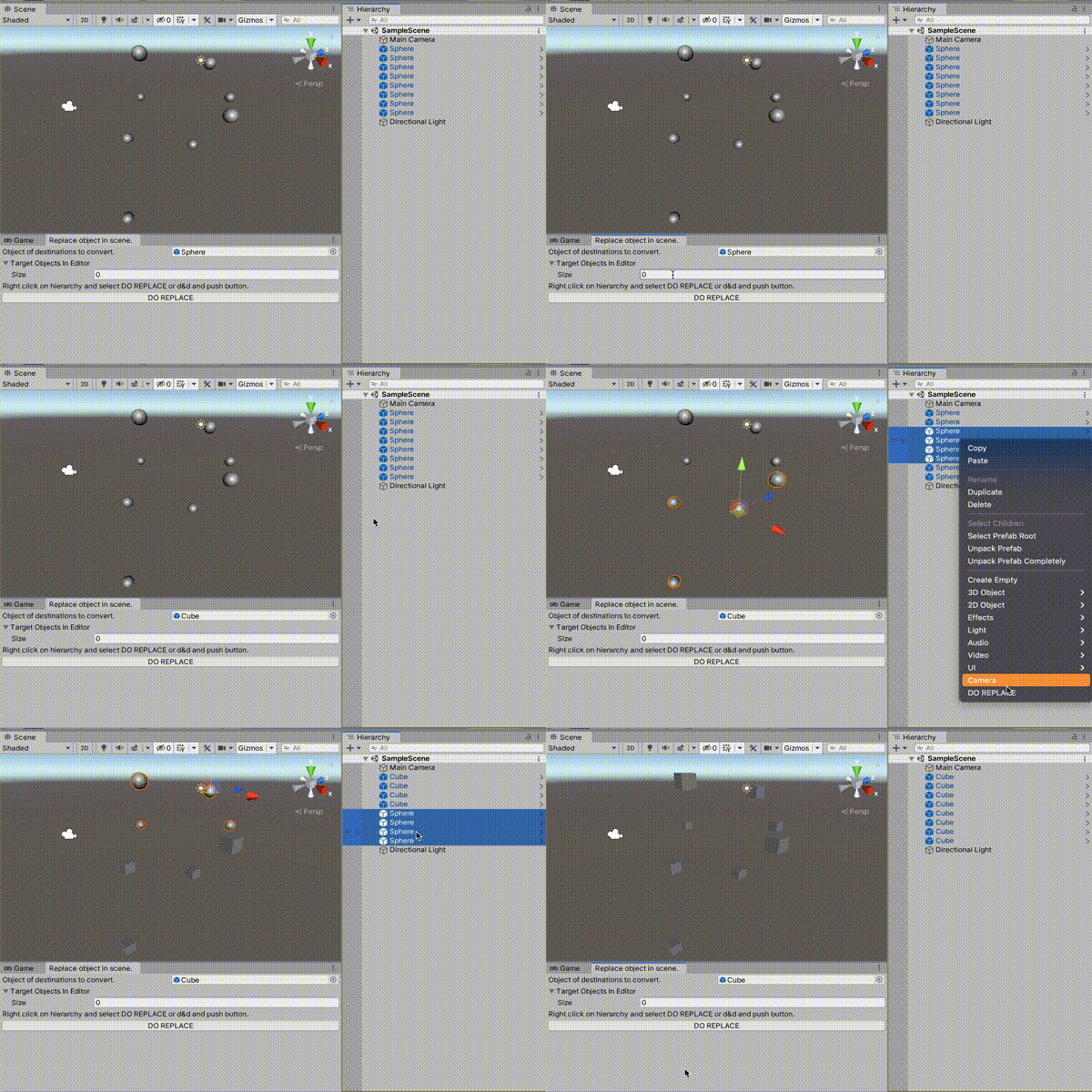
Gifの通り、2つの使い方ができます。
右クリックから置換
置き換えたいObjectをセット、置き換えられたいObjectを任意の数選択し、右クリック→置換
Windowから置換
置き換えたいObjectをセット、置き換えられたいObjectを任意の数D&Dし、ボタン押下→置換